 08:40
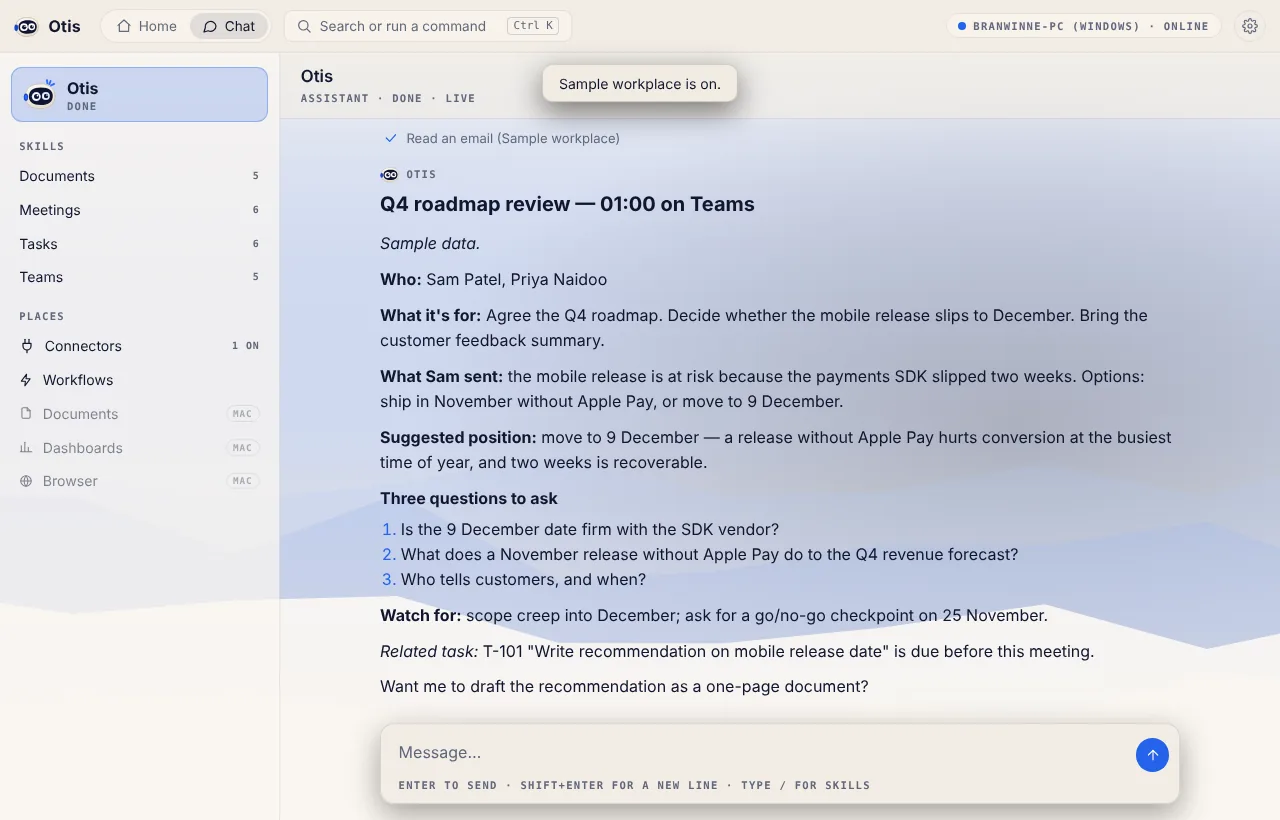
Prepare for my next meeting
Who's coming, what it's for, what they sent you, and the three questions worth asking.
For independent professionals and small teams in South Africa · Free early access · Windows and Android
Otis gathers meeting, email and available task context into a useful brief, then drafts a follow-up and next steps for you to review, as an email or a WhatsApp-ready message. Works with Microsoft 365 and Google. We help you set it up, and support you locally.
Works with Claude Code or Codex. Provider usage is billed separately; business use should use provider API billing or an approved integration.

See it in action
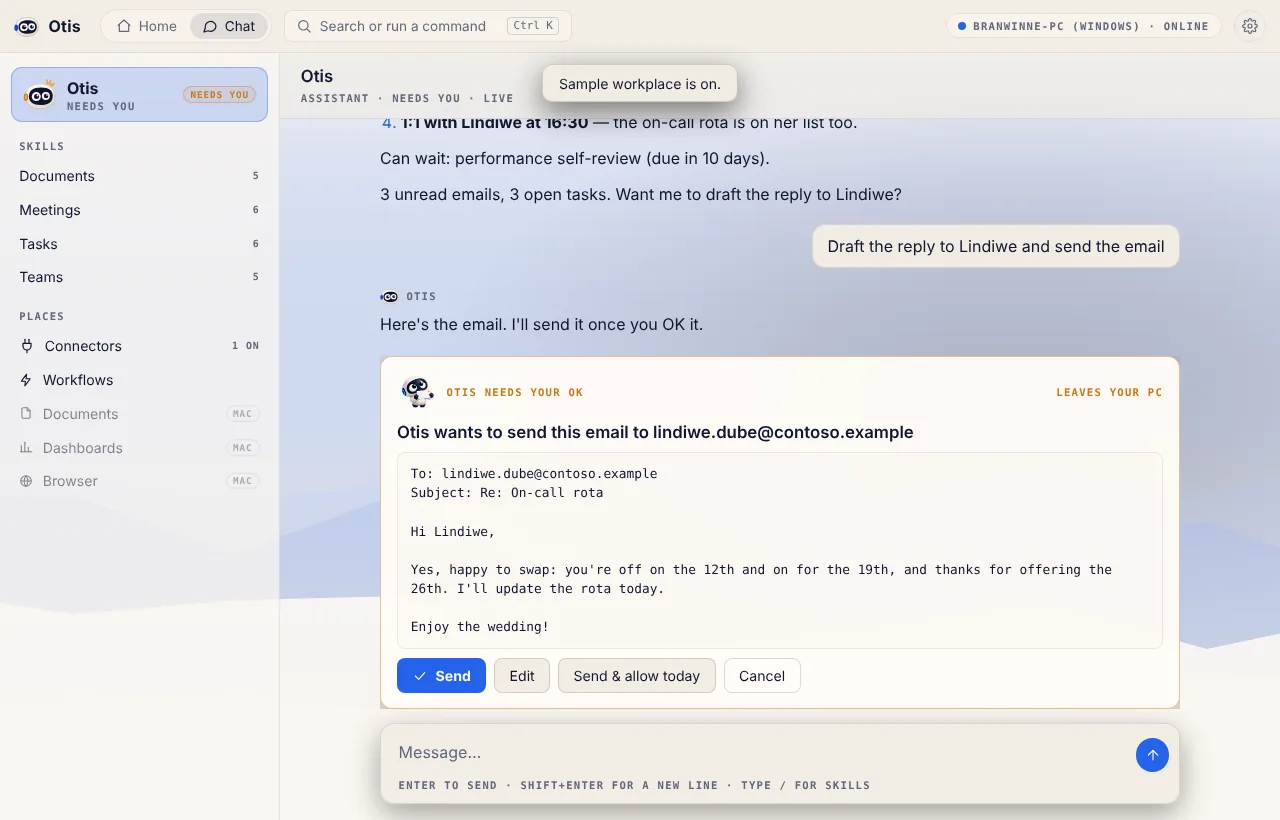
Home, a meeting brief, an email waiting for your OK, and the same Otis on your phone. Shown with the built-in sample workplace.
A day with Otis
08:40Prepare for my next meeting
Who's coming, what it's for, what they sent you, and the three questions worth asking.
 10:15
What needs my attention?
Your meetings, unread email and open tasks in one ranked list, with what to do about each.
 14:00
Draft a one-page proposal
A clean first draft, saved straight to your Otis folder, ready for you to edit.
 16:00, Fridays
Weekly wrap-up
A workflow that summarises your week and writes your status report, on a schedule.
You're in control
By default, Otis previews actions that send, change or delete connected data. You can edit, approve or cancel, and choose how often Otis asks for each type of action.

Works with your tools
Connect Microsoft 365, Google Workspace, Slack and more, or try the sample workplace first. Otis also supports MCP, an open way to add compatible tools.
On your phone
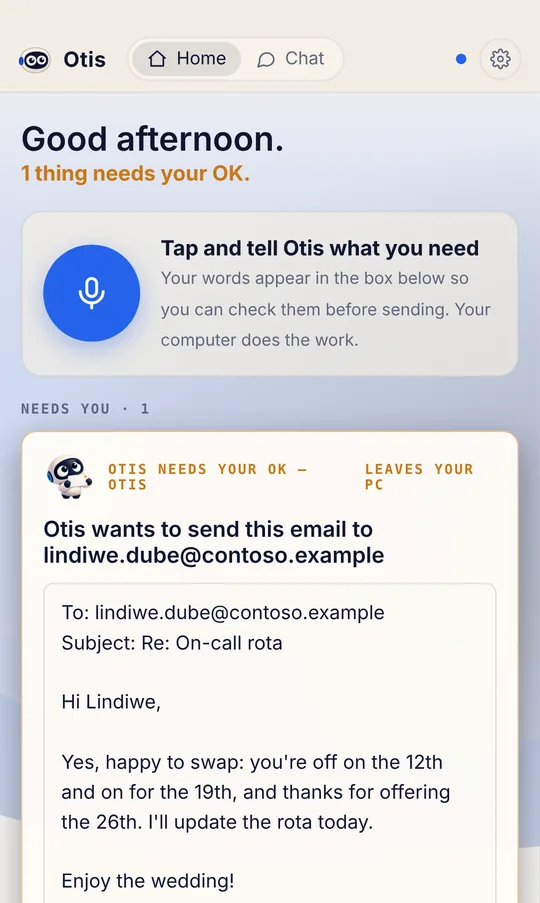
Tap the microphone and say what you need. Approve or cancel what Otis wants to send, and see that your computer is online. Your PC does the work; the phone just talks to it. Android app available now; iPhone later.
Privacy by design
Otis saves documents in its folder on your PC or Mac. Otis has no central server that stores your connected app data.
Otis sends your request and the connected information needed for the task to Claude or Codex under your account. Connector sign-ins are stored on your computer.
Connected actions show a preview by default. You choose per-action permissions; workflows always ask before external actions.
Meet Otis
You'll always know what Otis is up to.
 Hello
 ListeningThinkingWorkingNeeds your OKGot an ideaDone
 Thanks
Free early access
Otis is free to try during early access. Download it below, then follow the install guide. Prefer help? Tell us about your work with the form and we'll set it up with you, or ask about a supported, paid pilot.
Windows 10 and 11, 64-bit.
Download for WindowsOpens the download page with the installer, the MSI for IT teams, and step-by-step setup.
Speak a request, approve Otis's actions and check on your computer from your phone. Install Otis on your PC first; needs Tailscale on both.
Download for AndroidSigned Mac builds and an iPhone app are next. Mention it in your request if you'd like to try them.
Otis uses Claude Code or Codex. Provider usage is billed separately; paid business pilots should use API billing or an approved integration. We only use your request to decide on invites and contact you about Otis. See the privacy policy.
If the form doesn't work, email us to request an invite.
Questions
Download it free for Windows, and the Android app if you want Otis on your phone. The install guide walks you through setup. Prefer help? Tell us about your work and we'll set it up with you.
A Windows 10 or 11 PC (Mac is coming soon), plus Claude Code or Codex. Provider usage is billed separately. Paid business pilots should use provider API billing or an integration explicitly approved for Otis. In Otis, open Settings → AI engine and choose Connect.
Selected early-access testers can use Otis for free. There is also a supported four-week business pilot for one user at R999 once. It includes guided setup and two short reviews, with founder support capped at 90 minutes. It is invoiced before setup and does not renew automatically. The current continuation price hypothesis is R299 per user per month, invoiced manually if you choose to continue. AI-provider usage is separate and is not included; paid business use should use provider API billing or an integration explicitly approved for Otis. Personal subscription sign-in is for evaluation unless the provider approves that use. These prices are being tested and are not validated rates.
Yes. To answer, Otis sends your request and the connected information needed for the task to the AI engine you chose, under your account with that provider. Otis does not run its own central data server. Read the privacy policy for details.
Reading connected information and saving files in the Otis folder do not require approval. Connected actions that send, change or delete data show a card by default. You can set permissions to always ask, ask once a day, or not ask; Otis says in chat when it proceeds under a permission. Scheduled workflows always ask before external actions.
Early access builds aren't code-signed yet, so Windows shows “Windows protected your PC” (choose More info → Run anyway) and macOS says it can't check Otis for malicious software (open System Settings → Privacy & Security and choose Open Anyway). Signed builds are on the way.
Yes, for Android, as a test app: download it here. Tap the microphone and say what you need, approve or cancel Otis's actions, and see whether your computer is online. It connects to Otis on your PC through Tailscale, a free private-network app. iPhone comes later. Mention it in your invite request.